

We're a Content Production
Management Tool
Takes your team from idea to approved cut,
with every task, file and review in one place.

Still Juggling Frame.io, ClickUp, Drive and Slack for Every Content Piece?
 Google Docs
 ClickUp
 Frame.io
 Google Drive
 Slack
 Notion
 Dropbox
Every handoff is manual. The brief lives in Docs, the task in ClickUp, the cut in Frame.io, the files in Drive and the decisions in Slack. Someone copies links between them, and none of these tools tells the next one what changed.
Review & Approval
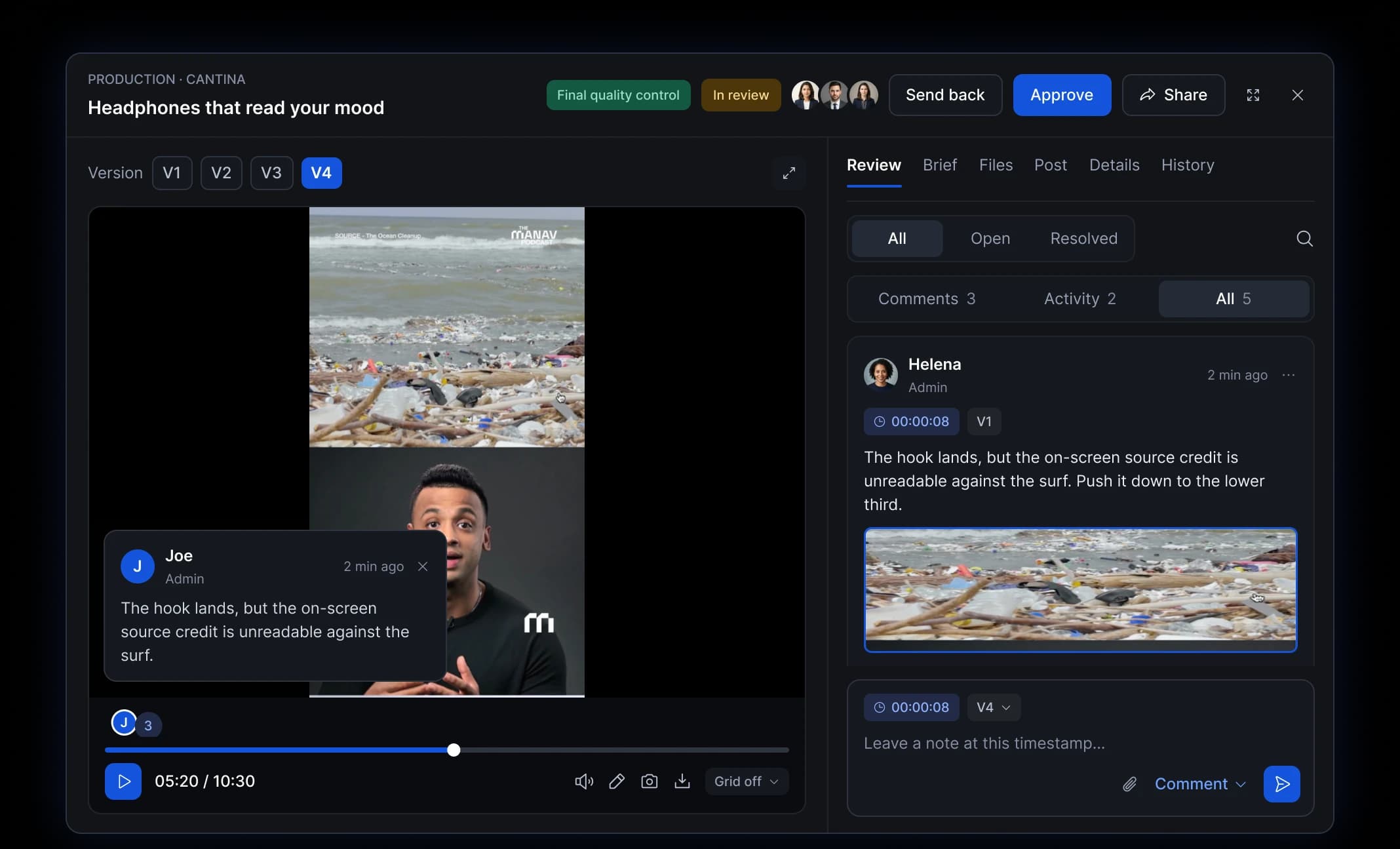
Comments pin to the exact frame, and approval happens on the same task.
ApproveJoe00:00:08Push the source credit to the lower third.
Instead of
- Frame.io
 Filestage
 Vimeo
Content Production
The content is the ticket. Deadline, editor and stage sit on the piece itself, so status is never out of date.
ProductionHeadphones that read your mood
Due 24 AugSusantiScriptMorning routine, 3 hooksInstead of
- ClickUp
 Asana
- Notion
Assets & Files
Raw footage, brand kits and final exports live on the ticket they belong to. One version, always current.
hook_v4.mp4V4 · CurrentBrand kit — Cantina12 filesraw_take_02.movV2Instead of
- Google Drive
- Dropbox
 Bynder
Planning & Handoffs
Briefs, owners and stages sit in one pipeline, so handoffs stop living in chat threads and docs.
BriefJoeScriptAnaProductionSusantiFinal QCJoeInstead of
- Google Docs
- Slack
- Notion
Everything You
Need to Run Production
Writers, voice artists and editors open one ticket and find the brief,
the assets and the notes for their step. No chasing, no digging through folders.
See Every Piece. Move Every Desk.
Producers and leads hand out work, sign off each gate and spot what
is stuck before it slips the posting date. One view across every brand.
Mastershorts Replaces Your Fragmented Content Production Management.
Briefs, assets, sound, feedback and final approval live in one ticket, from
Ideation to Final QC. Work moves forward without losing context between tools.
- Your team
- BriefsGoogle Docs
- FeedbackFrame.io
- AssetsGoogle Drive
- HandoffsSlack
One Platform, Not Five Tools.
From first idea to Final QC, every stage lives in one ticket. Fewer subscriptions, no chasing files, one clear view of every stage.

| Feature | Tools Team Use | The Problem | Why Mastershorts |
|---|---|---|---|
| Ideation & QC |
| Briefs, references and feedback are scattered across docs, boards and chat. | Structured brief in one ticket. Approve, reject or request changes right on the idea. |
| Assets Production & QC |
| Files live in one tool, feedback in another. Revisions are hard to track. | Work from the approved brief. Mark the exact spot and track each comment until it's resolved. |
| Sounds Production & QC |
| Audio notes land in chat with no timestamp. | Comments tied to the exact minute and second. Approved visuals hand off to sound automatically. |
| Final Production & QC |
| The final edit is reviewed without the earlier context and approvals. | Everything arrives organised, with every earlier approval visible on the same ticket. |
| Assets Library |
| Logos, templates and SFX are spread across drives. | One shared library. Search and download in seconds. |
- Notion
- Miro
- Google Docs
Briefs, references and feedback are scattered across docs, boards and chat.
Why Mastershorts: Structured brief in one ticket. Approve, reject or request changes right on the idea.
- Dropbox
- Frame.io
- Google Drive
Files live in one tool, feedback in another. Revisions are hard to track.
Why Mastershorts: Work from the approved brief. Mark the exact spot and track each comment until it's resolved.
- Frame.io
Audio notes land in chat with no timestamp.
Why Mastershorts: Comments tied to the exact minute and second. Approved visuals hand off to sound automatically.
- ClickUp
- Frame.io
The final edit is reviewed without the earlier context and approvals.
Why Mastershorts: Everything arrives organised, with every earlier approval visible on the same ticket.
- Dropbox
- Google Drive
Logos, templates and SFX are spread across drives.
Why Mastershorts: One shared library. Search and download in seconds.



“Our content kept getting lost between five tools. So we built the production hub we wanted.”
We run our own content production on Mastershorts, every single day. Briefs lived in docs, cuts in Frame.io and decisions in Slack, and every handoff cost us time. Mastershorts puts every idea, asset and approval on one ticket, so the whole team knows what comes next.
Frequently Asked Questions
Everything teams ask before moving their content work to Mastershorts.







Start Using Mastershorts
Set up your pipeline, invite your team and move your next content piece from brief to approved cut in one place.
Start free trial